
Choose the safest unfollow-checking method for the question
| Question | Method | What it can establish | Main limitation |
|---|---|---|---|
| Does one specific account follow me now? | Search your Followers list | Whether that username appears at the time of the check | No exact unfollow date or reason |
| Which identifiers disappeared between two dates? | Compare official data-export snapshots | Names present in the older snapshot and absent in the newer one | Changes, deactivations, and export scope need verification |
| Did my total audience rise or fall? | Record the visible count or professional Insights | Net movement over a defined period | Net change does not reveal individual follows and unfollows |
| Why did people unfollow? | Review content and audience context | Patterns and plausible hypotheses | No list comparison can prove personal motivation |
| Can an app show real-time unfollows? | Treat the claim as a security and accuracy review | Only what the app actually has permission and records to observe | Credentials, permissions, errors, and platform changes create risk |
Know what Instagram does and does not show
Instagram shows your current Followers and Following lists, and professional accounts can access audience and content information through their available Insights. It does not provide ordinary users with a complete page naming everyone who unfollowed, the exact time they did it, and why. Any tool that promises that history needs data from somewhere, so the access method matters.
A current list answers a current-state question. If a username is absent today, you need an older, dated record to show that it appeared before. Without that baseline, you cannot distinguish an unfollow from an account that never followed, a username change, an unavailable account, or a mistaken spelling. Screenshots can help for one case but are inefficient for a large comparison.
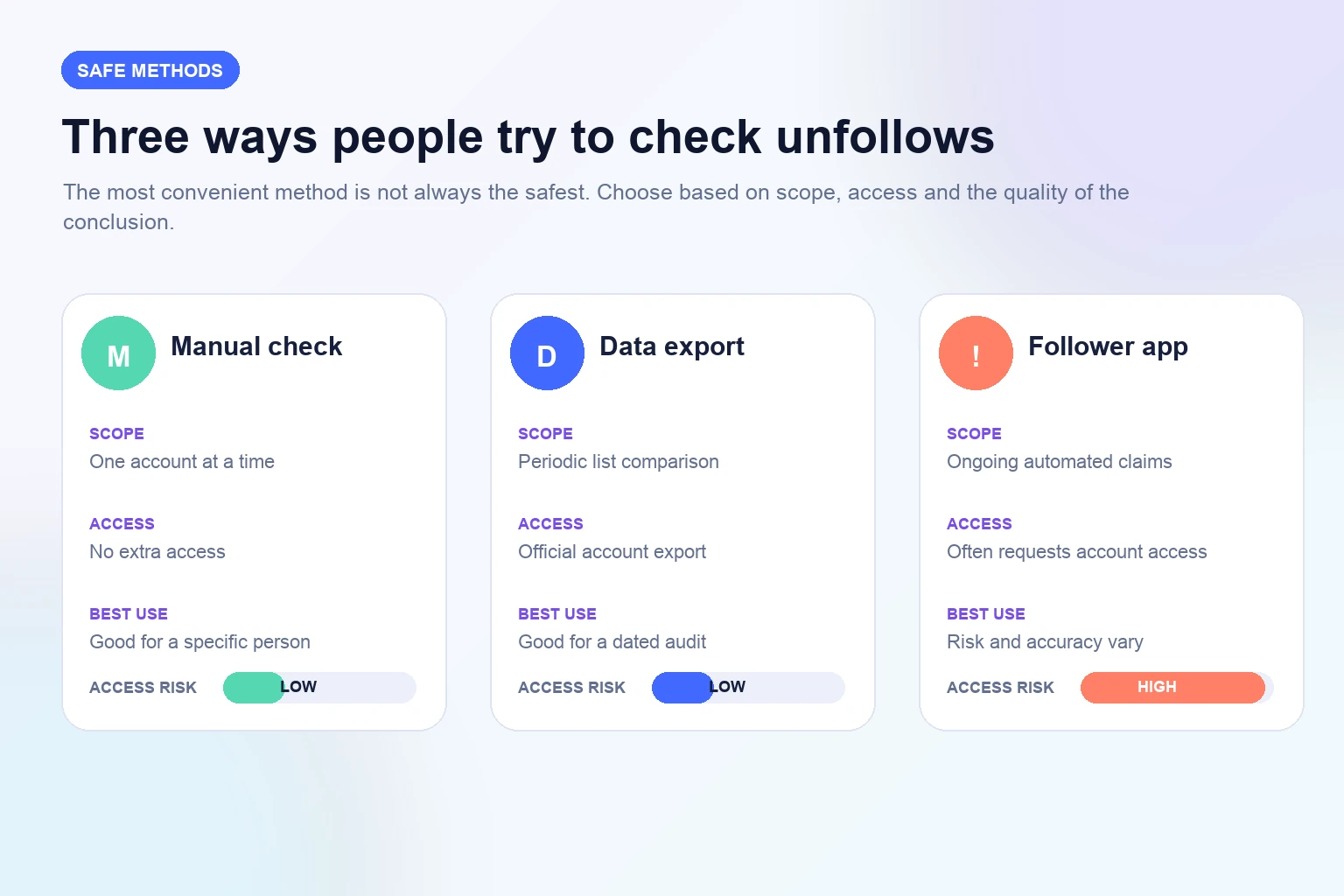
Set the scope before checking. You may want to verify one collaborator, understand a sudden total decline, or review audience retention over a month. Those questions require different evidence. The safer choice is the least invasive method that can answer the real question, not the app that produces the longest list.
Check one specific account manually
For one person, open your own Instagram profile and the Followers list, then search the person's current username. If the correct account appears, it follows you at the time of the check. If it does not, verify the spelling and identity. Display names are not unique, and a person may have changed their username or moved to another account.
Do not confuse Following with Followers. A button showing that you follow someone says nothing by itself about whether that person follows you back. Likewise, opening their Following list can be slower and may be affected by how the interface displays or searches large lists. Your own Followers search is the more direct current-state check.
Record the date only if the result matters for a business reason, such as partnership verification. Avoid repeatedly checking personal contacts or sending accusatory messages. A follow is voluntary and can change for many reasons. The method shows list membership at one moment, not intent, loyalty, or the quality of a relationship.
- Open your profile and Followers list.
- Search the person's current username carefully.
- Confirm the profile identity if names are similar.
- Record only what the list shows at that moment.
Request your information through Instagram
For a broader review, use Instagram's official information download through the Instagram app, website, or Accounts Center. Interface wording can change, but the control is generally found under account information or Your information and permissions. Select the relevant Instagram account and the follower or connection data you need rather than downloading unrelated personal information.
Choose a date range that includes the earlier baseline and a format you can inspect. HTML is convenient for reading; JSON is often easier to compare with a local script or spreadsheet process. Instagram prepares the archive and notifies you through its official flow. Request it from the app or a bookmarked official site, not from a link in an unexpected email or direct message.
The archive contains personal account data. Save it in a private location, limit team access, and delete copies that are no longer needed. Do not upload the entire archive to an unknown comparison website. A local comparison needs only the relevant follower identifiers and dates, not messages, contacts, photos, or other exported information.
- Use Instagram or Accounts Center, not a download link from a message.
- Choose the relevant account and follower information.
- Select a useful date range and format where the interface allows it.
- Store the archive privately and delete copies you no longer need.
Create two dated snapshots before looking for changes
One export is a snapshot, not an unfollow history. To detect change, preserve an older follower list and collect a newer list later using the same account and comparable scope. Name files with the account, source, and date, such as brandname-followers-2026-10-01. Store the unmodified originals and work from copies.
Choose a review interval that matches the decision. Weekly snapshots may suit an active campaign; monthly snapshots are usually enough for a general retention review. Very frequent exports create operational noise and sensitive files without explaining more. If a major campaign starts between snapshots, record its dates so you can interpret the interval in context.
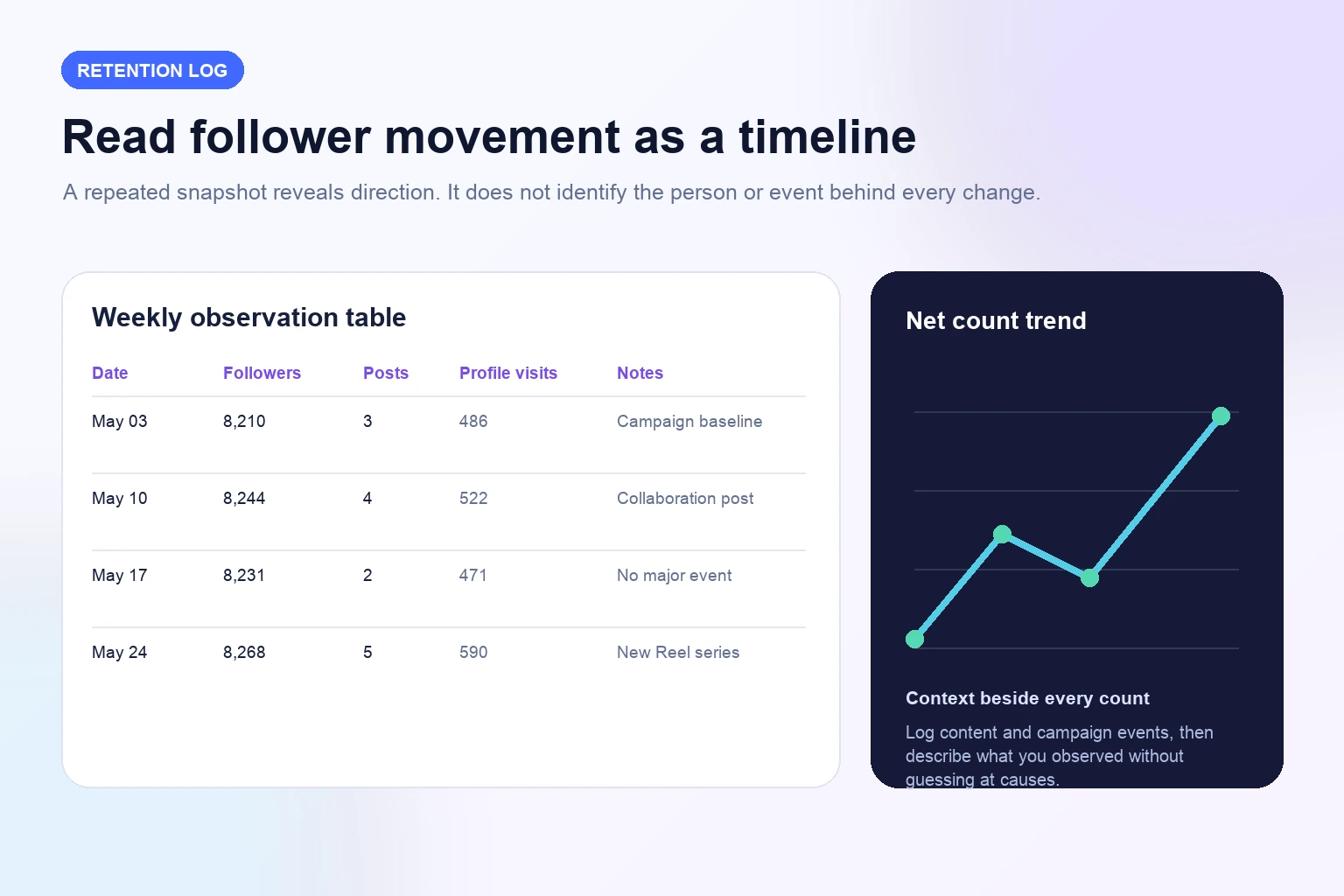
Also record the visible follower count, content published, promotions, collaborations, and account changes at each snapshot. These notes do not identify why any person left, but they help you see whether a decline occurred during silence, a topic shift, unusually high reach, a giveaway, or a period of audience growth.
Compare usernames locally and verify the exceptions
Extract the follower username or profile link from both snapshots. Normalize obvious formatting differences such as capitalization, leading at-signs, trailing slashes, or full profile URLs, but keep the original values. Create two results: identifiers present only in the older list and identifiers present only in the newer list. The first group contains possible unfollows or changed accounts; the second contains possible new followers.
A spreadsheet can handle a modest list with lookup or match functions, while a local script can compare larger sets. Keep the processing on a trusted device or approved company system. Do not paste usernames into a public AI prompt or random web tool, especially when the archive includes other personal information.
Review a sample of missing identifiers manually. Search Instagram for the old username, check whether the account is available, and look for evidence of a renamed profile. Label unresolved entries as missing between snapshots rather than confirmed unfollowers. This wording matches the evidence and leaves room for deactivation, removal, export differences, or a username change.
- Compare normalized usernames, not display names.
- Preserve the original snapshots before editing.
- Review missing identifiers manually before drawing a conclusion.
Interpret a missing username carefully
Two lists can establish that an identifier appeared in one snapshot and not the other. They usually cannot establish the exact time of departure or the reason. The person may have unfollowed, deactivated, been removed, changed usernames, or become unavailable. Platform exports and interfaces can also change, so preserve the source and comparison method.
Avoid treating every missing name as a content judgment. People clean up feeds, close projects, change interests, switch accounts, or leave Instagram. If many departures cluster in one period, compare themes, posting volume, promotions, giveaways, and acquisition sources. That can generate a useful hypothesis, but the list alone does not prove it.
For a client report, aggregate wherever possible. State the starting count, ending count, net movement, interval, and relevant events. Naming individuals rarely improves a marketing decision and can create needless privacy or relationship problems. Use account-level detail only when there is a legitimate operational reason, such as confirming a contracted collaborator.
Understand the risks of unfollower apps
Many follower-tracking apps promise instant or real-time unfollow alerts. To produce them, an app may ask for credentials, maintain a session, request broad permissions, scrape interfaces, or begin tracking only after installation. The result can be incomplete while the access risk is substantial. A polished dashboard does not show how the data was obtained.
Reject any service that asks you to type an Instagram password, authentication code, recovery key, or session cookie outside the official Instagram login flow. Do not install unknown configuration profiles or browser extensions. Even when an app uses a recognizable authorization screen, inspect the publisher, permissions, privacy policy, data retention, deletion process, and whether the requested scope is necessary.
Accuracy claims also need scrutiny. An app cannot reconstruct a complete history from before it had data unless Instagram supplies that history through an authorized source. If it labels every absent username an unfollow without checking deactivation or renaming, its confident notification may be misleading. Convenience should be judged beside access, methodology, and the consequences of error.
Secure the account if you already connected a tracker
If you entered your password into an unfamiliar app or site, change it through the official Instagram app or website. Review login activity and sign out sessions you do not recognize. Check the account email and phone number, protect the connected email account, and enable two-factor authentication. Keep recovery codes offline and never send them to support or a vendor.
Review apps and websites connected to the Instagram or Meta account, then remove access that is no longer necessary or that you do not recognize. Deleting the app from a phone may not revoke its server-side permission. Follow the official connected-app control and read the provider's deletion process if it stored a separate account.
If the username, email, password, or profile information changed without permission, use Instagram's official account recovery route. Tell collaborators to ignore unexpected messages while control is uncertain. Document the incident for a business account, but do not circulate passwords or full data archives as evidence.
- Change the Instagram password from the official app or site.
- Review login activity and sign out unfamiliar sessions.
- Remove unnecessary connected apps and websites.
- Turn on two-factor authentication and protect recovery details.
Build a useful monthly follower-retention log
A simple log is more valuable than a stream of alerts. Once a week or month, record the visible follower count, number of posts, major content themes, profile visits or reach available in Insights, paid promotions, collaborations, and unusual events. Use the same reporting window and source each time so the rows can be compared.
Calculate net change as ending followers minus starting followers. Do not call that number unfollows: an account can gain 200 and lose 150 while showing a net increase of 50. Without separate valid follow and unfollow counts, net movement cannot reveal churn. Label rounded public counts as rounded.
Add short qualitative notes from comments, story replies, direct messages, and customer conversations. An audience can become smaller and more relevant, or larger and less responsive. Retention matters, but it belongs beside audience fit, content usefulness, and business outcomes rather than replacing them.
Respond to unfollows by improving relevance
Review which content earned saves, thoughtful comments, replies, profile visits, or qualified actions during the same period. Compare themes and formats across several posts, not one outlier. Look for a mismatch between what the bio promises and what the account publishes. If a new audience came from a giveaway or unrelated viral post, later departures may reflect weak fit rather than a broken account.
Choose one adjustment for the next cycle: narrow the topic, make the series more consistent, explain the value earlier, reduce repetitive promotion, improve captions, or publish at a sustainable rhythm. Keep the test period long enough to produce several comparable pieces. Changing every variable after one unfollow alert makes the outcome harder to interpret.
Do not chase or shame individuals. A public follow is not a contract. If a partnership requires continued following, define that expectation in the partnership agreement and verify it respectfully. For the wider audience, the useful response is better positioning and content, not surveillance.
- Compare content themes and formats across the period.
- Read comments, replies, and messages for audience feedback.
- Improve relevance and consistency before trying to reverse every loss.
Handle unfollows around a paid follower campaign
Before a follower purchase, save the public destination, displayed count, date, package, quantity, and terms. During the stated period, record a limited number of observations and any provider status. Afterward, continue the normal retention log. This creates a timeline without claiming that every follow or unfollow belongs to the order.
If the package includes a written refill or retention condition and the count changes, review its exact period, scope, and evidence requirements. Contact support with the order reference and dates. Do not give support an Instagram password or complete data archive. A concise record is enough to identify the transaction and question.
Evaluate the purchased scope separately from content performance. A follower campaign changes a profile-level count under its written terms; it does not guarantee reach, likes, comments, customers, or a particular feed ranking. Keep publishing useful work and use each metric for the decision it can actually support.
Explore Instagram FollowersFrequently asked questions
Does Instagram tell you who unfollowed you?+
Instagram shows current Followers and Following lists, but ordinary accounts do not receive a complete timestamped unfollow report with reasons. You need an older record to demonstrate that a username appeared before and is missing later.
How can I check whether one person still follows me?+
Open your own profile, open Followers, and search the person's current username. Verify the identity if names are similar. This shows whether the account appears at the time of the check; it does not show when or why a change happened.
Can I see unfollowers with an Instagram data download?+
Two official data snapshots can be compared to find identifiers present in the older list and absent in the newer one. Review exceptions because a missing identifier may also reflect a username change, deactivation, removal, availability issue, or export difference.
Are Instagram unfollower apps safe?+
Risk varies, but an app that asks for your Instagram password, authentication code, session cookie, or broad unnecessary access should be avoided. Even an authorized app needs a clear publisher, limited permissions, accurate method, privacy policy, and deletion process.
Can a third-party app show old unfollows from before installation?+
Be skeptical. An app can only report history available from an authorized source or data it recorded. A claim to reconstruct a complete earlier history should explain the source and limitations.
What should I do after sharing my password with a tracker?+
Change the password through official Instagram, review and end unfamiliar sessions, remove unnecessary connected apps, enable two-factor authentication, protect the recovery email, and use Instagram's account-recovery route if control is uncertain.
Does a lower follower total equal the number of unfollows?+
No. The visible difference is net change. An account may gain and lose followers during the same period, while deactivations and display changes can also affect observations. Do not label net decline as a complete unfollow count.
How often should a business review follower retention?+
A weekly or monthly review is usually more actionable than constant checking. Use a consistent date, source, and reporting window, then add content and campaign context so the count supports a decision rather than anxiety.
Compare Instagram Followers packages.
Prepare the public destination, then review the quantity and terms that fit your goal.
Explore Instagram follower packages