
Match the Instagram feed problem with the right control
| What you notice | Control or action | What it is intended to influence | What it does not promise |
|---|---|---|---|
| Recommendations broadly feel irrelevant | Reset suggested content | A fresh start for recommendations across Feed, Reels, and Explore | Deletion of posts, follows, messages, ads, or account history |
| One suggested topic keeps appearing | Not interested; Hidden Words where appropriate | Fewer similar or matching recommendations | Perfect filtering of every related post |
| You want more from chosen accounts | Favorites and meaningful interaction | Higher priority for selected followed accounts | That every post will appear first |
| You want only recent posts from follows | Following feed | A chronological view of accounts you follow | A permanent change to the main recommendation feed |
| Your own posts reach fewer people | Review Account Status, Insights, content, and official creator guidance | Diagnosis of creator-side eligibility and performance | A fix through resetting what you personally see |
Understand what people call the Instagram algorithm
Instagram does not have one universal feed switch. Feed, Reels, Explore, Search, Stories, and other surfaces can use different ranking and recommendation processes. Meta explains that systems predict which content may be relevant using information about content and activity. The mix changes as you follow accounts, watch, like, save, search, share, hide, or signal disinterest.
When people say the algorithm is broken, they may mean several things: suggested posts are off-topic, Reels repeat an unwanted theme, Explore reflects an old interest, recent followed accounts are hard to find, or their own posts receive different reach. The recommendation reset is designed for the first group of viewer-side problems. It is not a universal repair for every Instagram outcome.
Name the surface and symptom before changing anything. Save three examples and ask why each is unwanted: topic, source, repetition, sensitivity, language, or timing. This diagnosis tells you whether to reset broadly, mark one theme Not interested, adjust Hidden Words, unfollow sources, or use a different feed view.
Know exactly what the recommendation reset changes
Meta describes Reset suggested content as a way to clear recommended content across Explore, Reels, and Feed so recommendations can personalize again over time. The control also offers an opportunity to review accounts you follow. It focuses on suggestions and the future signals that rebuild them.
The reset does not delete your posts, followers, following relationships, messages, comments, saved drafts, archive, or account. It does not erase legal or security records, remove ads, change every privacy setting, or guarantee that a chosen topic will disappear. Review the explanation shown in your own app because product wording and availability can change by version, account, and region.
It also does not reset the distribution of your own posts to other people. A creator who wants to diagnose falling reach should inspect Account Status, recommendation eligibility where available, content Insights, audience response, and current creator guidance. Changing what the creator personally sees answers a different question.
Audit the current feed before you reset
Spend ten minutes reviewing Feed, Reels, and Explore separately. Record recurring topics, accounts, formats, and languages that no longer fit. Then list three to five themes you want more of. A reset without a target leaves you likely to repeat the same mixed behavior that produced the current recommendations.
Review the accounts you follow. Unfollow or mute accounts you no longer want in your experience, but do not perform hundreds of rapid actions. Keep accounts that remain useful and consider adding the most valuable to Favorites. Review saved posts and recent searches when those collections no longer represent your interests.
Check existing controls before choosing the broad reset. Hidden Words can reduce recommendations containing selected words or phrases, Sensitive Content Control manages certain sensitive recommendations, and Not interested can address a recurring theme. A narrow control may solve a narrow problem without clearing the wider recommendation profile.
- Capture examples of the unwanted topics or accounts.
- Review who you follow and remove sources you no longer value.
- Check Hidden Words, sensitive-content settings, Favorites, and prior interactions.
- Decide which three to five topics should replace the current mix.
Use Instagram's Reset suggested content control
In the Instagram mobile app, open your profile and the main menu. Open Content preferences, then choose Reset suggested content when the option is available. Read the explanation and proceed through the review screens. Meta's published path uses these labels, but navigation may move as the app changes, so update Instagram and use Settings search if the control is not where expected.
Review the accounts Instagram offers during the process. This is a useful opportunity to remove stale sources, but it is not necessary to unfollow every account. Keep relationships and publications you genuinely want. A thoughtful follow list gives the system stronger context after the reset than an empty or randomly edited list.
Confirm only when you understand the scope. There may not be a button that restores the previous recommendation state. Your content suggestions will begin personalizing again based on subsequent activity. If you manage a shared business device or account, make sure the person authorizing the reset understands that it changes their viewing experience.
- Open your Instagram profile and the main menu.
- Open Content preferences or the current equivalent.
- Choose Reset suggested content if the control appears.
- Review the explanation and following list, then confirm deliberately.
If the reset option is missing, use the controls you have
First update Instagram through the official app store, close and reopen it, and search Settings for Content preferences or suggested content. Feature availability can differ by account or rollout. Do not install a modified app, configuration profile, or third-party cleaner that promises to unlock the control.
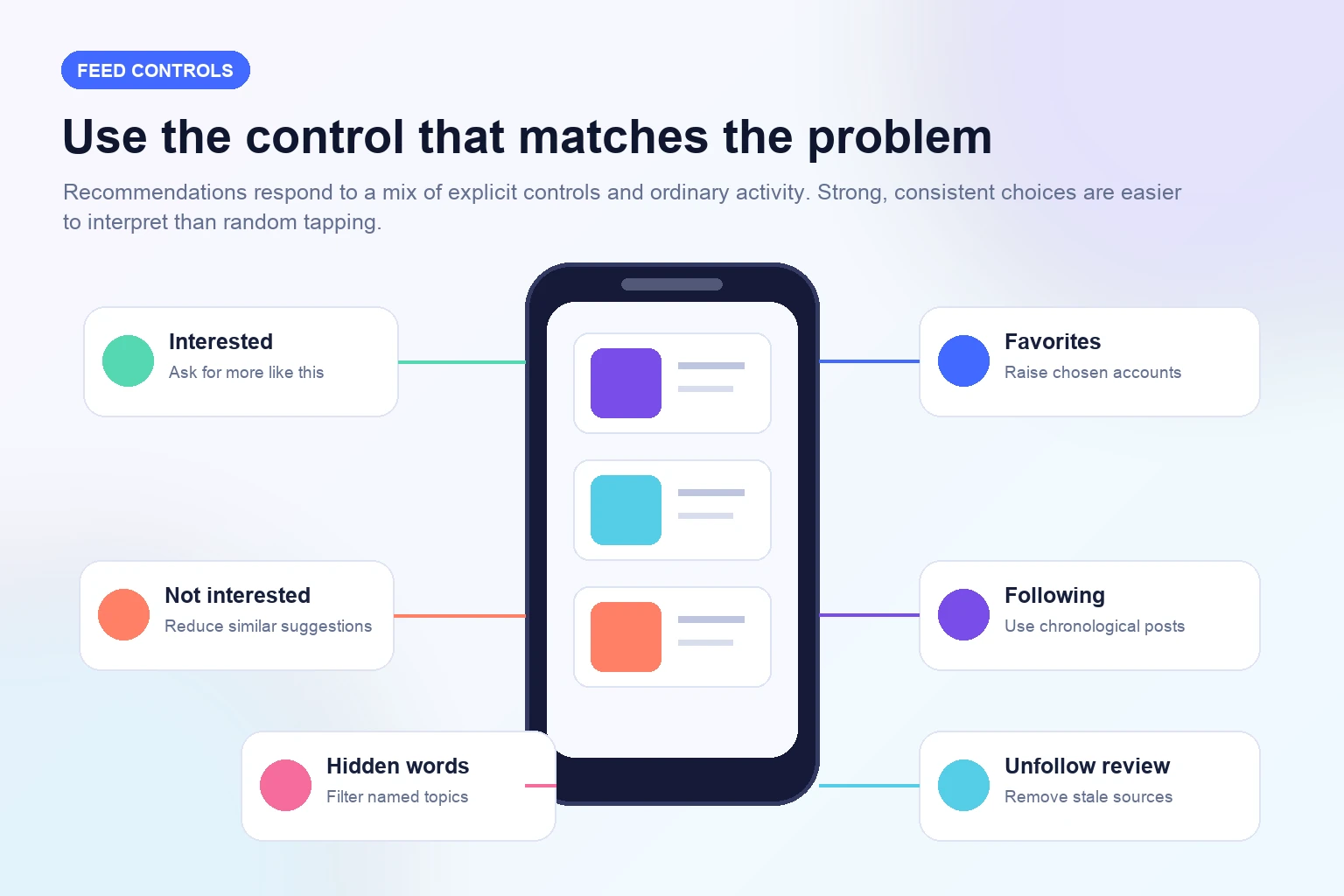
You can still retrain recommendations manually. Mark clearly irrelevant suggestions Not interested, use Interested where available for excellent matches, remove stale follows, add priority accounts to Favorites, search deliberately, and stop lingering on unwanted content. Use Following when you want a chronological view of accounts you already chose.
For repeated words or themes, review Hidden Words and the controls presented for suggested content. For sensitive material, use the current Sensitive Content Control and reporting tools where content violates rules. Muting, unfollowing, blocking, and reporting solve different problems; choose the action that accurately describes the issue.
Stop sending accidental interest signals
People often watch an annoying Reel to the end, open its comments, share it privately to complain, and then wonder why similar posts appear. Recommendation systems can interpret attention and interaction as useful signals even when the emotion is negative. If you do not want more of a theme, use Not interested and move on instead of repeatedly engaging with it.
Avoid broad curiosity during the first few days after a reset. Random searches, rapid taps across unrelated topics, and saving posts you do not actually value create a noisy preference profile. Use a separate browser search or another account for one-off research when it should not shape the personal feed.
Be deliberate with follows and saves. Follow an account because you want its future work, not because one post was attractive. Save content you expect to revisit. Meaningful, consistent actions create a clearer pattern than liking dozens of posts as a courtesy.
Retrain Feed, Reels, and Explore for seven days
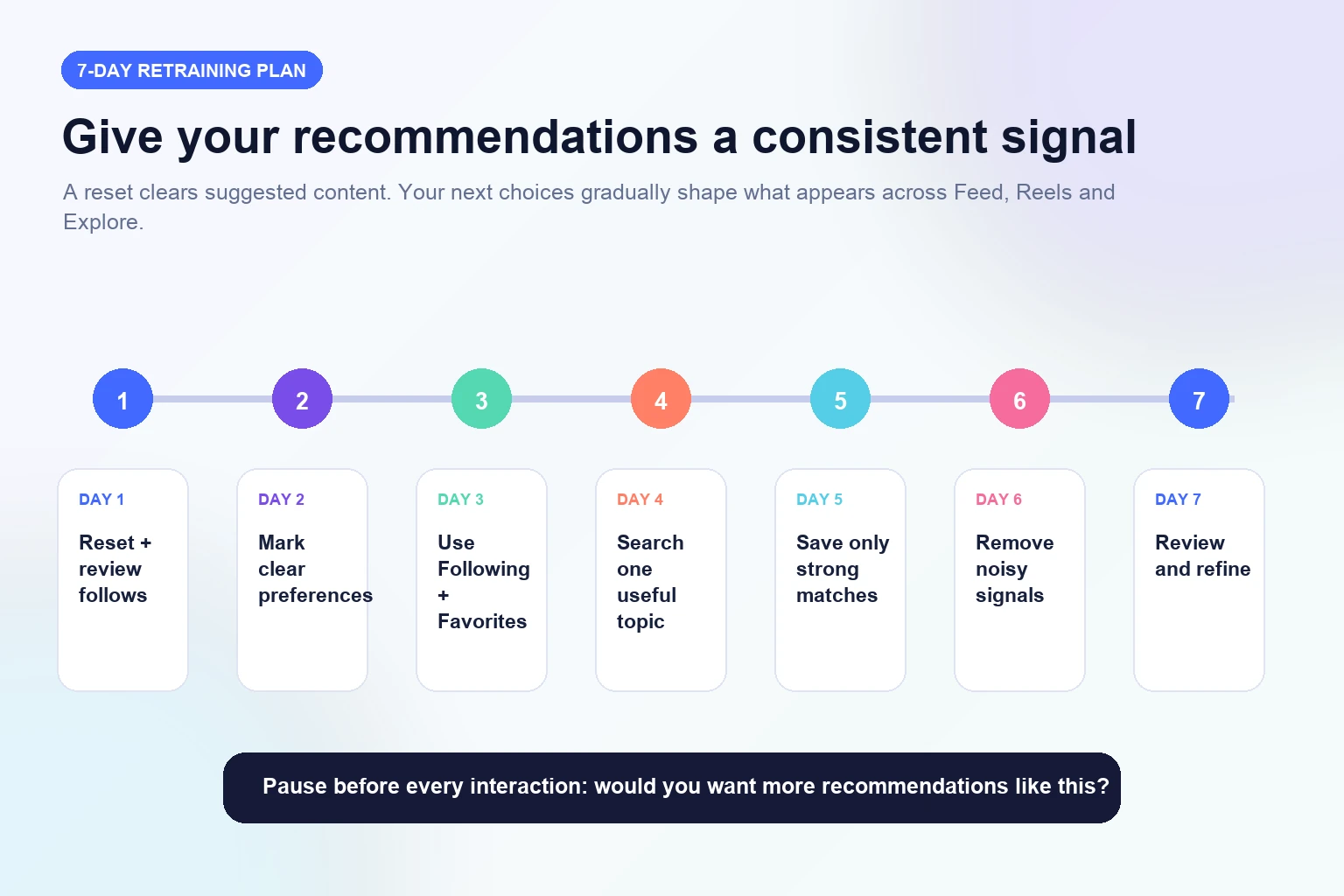
On days one and two, choose only strong examples of the topics you want. Use Interested where available, save a small number of genuinely useful posts, and mark obvious mismatches Not interested. Do not try to transform the feed in one long session. Short, consistent visits are easier to keep intentional.
On days three and four, add trusted accounts to Favorites, use the Following feed, and search one desired topic at a time. Open profiles that consistently publish useful work and view several relevant posts. On days five and six, continue those patterns and remove follows or saved items that pull the experience back toward old interests.
On day seven, review Feed, Reels, and Explore separately. Note which surface improved and where noise remains. Apply a narrow control to recurring problems and continue normal, purposeful use. The goal is not a perfectly pure feed; it is a noticeably more relevant mix that can adapt as interests change.
- Days 1–2: make explicit Interested and Not interested choices.
- Days 3–4: use Favorites, Following, and focused topic searches.
- Days 5–6: save and watch only strong matches; remove noisy signals.
- Day 7: review Explore, Reels, and Feed separately and refine.
Use Following and Favorites for more control
Following provides a chronological view of posts from accounts you follow, according to Meta's published description. It is useful when you want recent work without suggested posts. It does not permanently replace the main feed, so learn how to switch views when catching up matters more than discovery.
Favorites helps prioritize selected followed accounts and offers a dedicated way to catch up with them. Reserve it for sources that consistently matter: close contacts, trusted publications, core customers, collaborators, or experts. Review the list occasionally so it reflects current priorities rather than becoming another forgotten collection.
These views complement a reset. Following restores a predictable time-based view, Favorites raises chosen relationships, and the main feed continues to blend followed and recommended material according to its current design. Using each for its purpose reduces the feeling that one algorithm controls every Instagram session.
Separate your personal feed from your creator reach
Resetting suggested content changes what the account sees. It does not instruct Instagram to show that account's posts to more people. Creator distribution depends on separate systems, content and account eligibility, audience response, competition for attention, and other factors Meta describes in its ranking materials.
If your own reach changes, check Account Status and any recommendation-eligibility information Instagram provides. Review Insights for the affected surface, compare like-for-like posts, and note changes in topic, hook, format, timing, audience, or promotion. One lower result is a data point, not proof of a penalty.
Keep business goals separate again. Reach is not the same as followers; followers are not the same as engagement; engagement is not the same as revenue. A follower package may address profile presence, while a content plan and distribution review address reach. Use a growth provider only for the deliverable it clearly defines.
- Viewer question: why am I seeing these posts?
- Creator question: how are my posts performing and are they eligible for recommendation?
- Business question: are content and audience actions contributing to real goals?
Improve the content signals on your own profile
Creators cannot reset their way into stronger audience response, but they can make the profile easier to understand. Align the name, category, bio, link, pinned posts, and current content series. A visitor who arrives from a recommendation should quickly understand the subject, audience, and next useful action.
Review several comparable posts rather than chasing one format. Examine opening clarity, watch behavior, saves, shares, thoughtful comments, profile visits, and follows where available. Read the responses to learn which questions deserve a follow-up. Meta's professional-dashboard Best Practices area can provide current education and personalized tips for eligible creators.
Publish original, useful work at a pace you can sustain. Test one meaningful change at a time, such as a clearer opening, stronger example, better sequence, or more specific caption. Do not buy or automate random interactions to train the algorithm; those actions confuse measurement and may conflict with platform rules.
Maintain a relevant feed without constant resets
Use Not interested when a clear mismatch appears and Interested when an excellent recommendation deserves reinforcement. Review follows and Favorites monthly, clean up obsolete searches or saved collections when useful, and update Hidden Words as topics change. Small maintenance prevents months of mixed signals from accumulating.
Before resetting again, diagnose the scope. If one theme is the problem, use a narrow control. If only the main feed feels crowded, use Following or Favorites for a focused session. If every recommendation surface reflects an old identity or long period of accidental browsing, a broader reset may be reasonable.
Keep expectations realistic. Recommendations will always include experimentation, and the available controls can change. The practical aim is not total prediction; it is a feed you can steer, understand, and correct. Revisit official Meta and Instagram guidance when navigation or features differ from this guide.
- Use Not interested as the problem appears.
- Review follows and Favorites monthly.
- Keep searches and saves aligned with current interests.
- Reset again only when broad recommendations are persistently off-topic.
Frequently asked questions
Can you reset the Instagram algorithm?+
Instagram offers Reset suggested content for eligible app versions. It clears recommendations across Feed, Reels, and Explore so they can personalize again. It is more accurate to call this a recommendation reset than a reset of every system Instagram uses.
Where is Reset suggested content?+
Meta's published path is Profile, main menu, Content preferences, then Reset suggested content. Labels and availability can change, so update the app and search Settings if it is missing. Do not install an unofficial app to unlock it.
What does the reset delete?+
The control is for suggested content. It does not delete your posts, followers, follows, messages, archive, or account. Review the current confirmation screen in your app before proceeding because product details can change.
How long does Instagram take to retrain recommendations?+
Meta says recommendations personalize again over time, but it does not promise one universal number of hours or days. Consistent choices across several sessions are more useful than expecting an immediate, permanent result.
How do I tell Instagram what I want to see?+
Use Interested where available, save strong matches, follow relevant accounts, add priority accounts to Favorites, search deliberately, and use Not interested or Hidden Words for clear mismatches. Avoid prolonged engagement with content you do not want.
Will resetting recommendations increase my post reach?+
No direct increase is promised. The reset changes what your account sees. To investigate your own reach, review Account Status, recommendation eligibility, Insights, content quality, audience response, and current official creator guidance.
What if I cannot find the reset option?+
Update Instagram, restart the app, and search Settings for Content preferences. You can still retrain manually with Interested, Not interested, Favorites, Following, deliberate searches, follow cleanup, and Hidden Words.
Should I unfollow everyone before resetting?+
No. Keep accounts you still value, remove stale sources thoughtfully, and use Favorites for priority relationships. Mass unfollowing can damage useful connections and is unnecessary for a recommendation reset.
Compare Instagram Followers packages.
Prepare the public destination, then review the quantity and terms that fit your goal.
Compare Instagram follower packages