Adaptable Instagram Live run of show
| Segment | Host's job | Moderator's job | Viewer signal to watch |
|---|---|---|---|
| Opening | State the topic, outcome, and immediate reason to stay | Confirm audio and video; pin the session context if available | Early comments, technical reports, and exits |
| Orientation | Explain the plan and introduce any guest | Collect repeated questions and share participation guidance | Whether viewers understand what is happening |
| Core value | Teach, demonstrate, interview, or review the promised subject | Group useful questions and note timestamps | Sustained viewers, relevant questions, and confusion points |
| Interaction | Answer selected questions and invite a specific response | Filter spam, protect privacy, and keep the queue focused | Quality of responses rather than comment volume alone |
| Close | Recap the useful points and give one next step | Share the verified destination and save session notes | Profile actions, link activity, replay interest, or follow-up messages |
Define what ‘more Instagram Live viewers’ means
A larger peak viewer number is only one possible goal. A useful Instagram Live can aim for sustained attention, qualified questions, product understanding, event participation, profile visits, replay use, or a clear follow-up action. Choose one primary goal and two supporting signals before planning the content. Otherwise, the team may celebrate comment volume while missing that viewers never received the promised answer.
Use the exact metrics and labels currently available to your account. Instagram features and Insights can vary by account type, region, eligibility, and product updates. Live viewers, peak concurrent viewers, accounts reached, views, comments, profile activity, and replay performance—where available—should not be treated as interchangeable. Save screenshots or exports with dates and definitions so later sessions can be compared fairly.
If an Instagram Live views package is part of the plan, give it a separate target and record. The package applies to the eligible public broadcast, quantity, timing, and terms described by the service. It cannot demonstrate that viewers understood the content or took an organic action. The editorial plan still needs its own audience promise, promotion, delivery, and follow-up.
Choose one audience and one useful outcome
Write the event promise as a sentence: ‘This Live helps [specific audience] achieve or understand [specific outcome] through [format].’ A restaurant might demonstrate three finishing techniques for home cooks. A software company might walk operations managers through a month-end process. A creator might interview a guest about one well-defined career decision. Each gives a viewer a reason to choose the session over an open-ended chat.
Keep the scope narrow enough to fulfill during the planned session. ‘Everything about Instagram growth’ is difficult to prepare, promote, or remember. ‘How to plan a five-part Story sequence that retains the key message’ is concrete. A focused topic also produces clearer reminder content, better questions, more useful clips, and a replay whose title describes what a person will receive.
Decide the primary next step before writing the run of show. It might be saving a checklist, watching a related guide, joining the next session, visiting a product page, or sending one qualified question. Use one main action. Several unrelated calls to action compete with the teaching and make measurement ambiguous.
- One primary audience, described in ordinary language.
- One specific outcome viewers can expect.
- One format: demonstration, interview, review, workshop, or question session.
- One primary next step after the broadcast.
Create an event brief the whole team can use
The brief should contain the title, audience, outcome, format, host, guest, date, time, timezone, expected duration, public account, topic boundaries, primary action, promotion channels, and owner for each task. Add pronunciation, access, disclosure, and brand notes where relevant. If a guest participates, confirm how the current Instagram Live interface and eligibility work well before the event.
Research the questions the audience already asks. Review comments, support conversations, search language, previous Live notes, and relevant community discussions. Accurate hashtags can help label promotional posts, but they should come from the event's real subject rather than a generic viral list. Select terms only after reviewing their current meaning and results.
Define what the session will not cover. A boundary helps the moderator route off-topic questions and lets the host answer sensitive requests responsibly. For financial, medical, legal, or personal account matters, prepare a clear route to qualified help instead of improvising. A focused session feels more useful because the audience understands the promise and the limits.
Promote the Live as a sequence of useful reminders
Announce the event early enough for the intended audience to plan. State the exact outcome, date, time, timezone, host, and whether a replay is expected—only if you can commit to one. Then use reminders that add information: a short preview, one audience question, a guest introduction, a demonstration teaser, or the checklist viewers should bring. Repeating ‘we are going live’ without new value trains people to ignore the message.
Use the channels you already own: Instagram posts and Stories, a broadcast channel if available and appropriate, email, your website, and relevant partner accounts. Meta describes broadcast channels as a one-to-many way for creators to share updates and use features such as polls. Treat each placement according to its own rules and audience. Do not mass-post the invitation into unrelated communities.
Give guests and partners a share kit with the verified account, event promise, time in relevant timezones, accessible visual, and approved link. Track which reminders actually went out. Promotion is part of the experiment: if one session received guest distribution and another did not, note that before comparing their audiences.
- Publish the outcome and time early enough for planning.
- Use Stories and owned channels for reminders with new information.
- Give guests and partners a verified share kit.
- Answer the practical attendance questions before the event.
Rehearse the technical, safety, and team plan
Test the device, Instagram app, account access, connection, power, camera, framing, lighting, and microphone in conditions similar to the event. Use headphones where they prevent echo. Clean the lens, silence unnecessary notifications, and place essential notes where the host can glance without leaving the audience. A backup connection or device is useful only when someone knows how and when to switch.
Assign roles. The host delivers the conversation. A moderator monitors audio and video reports, filters repeated questions, watches for spam or harassment, protects private information, and records useful timestamps. A producer can manage the clock, guest connection, assets, and backup plan. In a small team, one person may combine roles, but the responsibilities should still be written down.
Confirm permissions for guest appearances, music, demonstrations, trademarks, customer material, and any people visible in the location. Review current comment controls and community standards. Prepare a short response for technical interruption and a decision point for ending the session. Safety and rights are production requirements, not tasks to invent while live.
- Test connection, camera, lighting, power, and sound.
- Assign host, moderator, producer, and guest responsibilities.
- Prepare a backup device and a simple failure message.
- Review privacy, permissions, rights, and comment controls.
Use the opening minute to orient and deliver value
Begin on time when possible and state the subject immediately. Welcome viewers, name the outcome, explain the format, and deliver one useful point rather than waiting silently for a larger audience. People arriving early should not be punished with filler. A strong opening gives them a reason to stay and produces a cleaner replay.
Acknowledge that people join throughout the broadcast without restarting the full introduction every minute. Use a one-sentence orientation at natural transitions: ‘We are demonstrating three ways to improve a product photo; the lighting check is next.’ If the interface allows a pinned comment or similar context, keep it concise and current. The host can welcome names selectively without allowing greetings to replace the promised content.
Tell viewers how to participate. Ask for a location only when it is relevant and safe, request questions around the defined topic, or offer two choices that shape the next example. Avoid collecting sensitive personal information in public comments. Specific participation creates a better signal than asking everyone to type an arbitrary word simply to increase activity.
Follow a flexible run of show
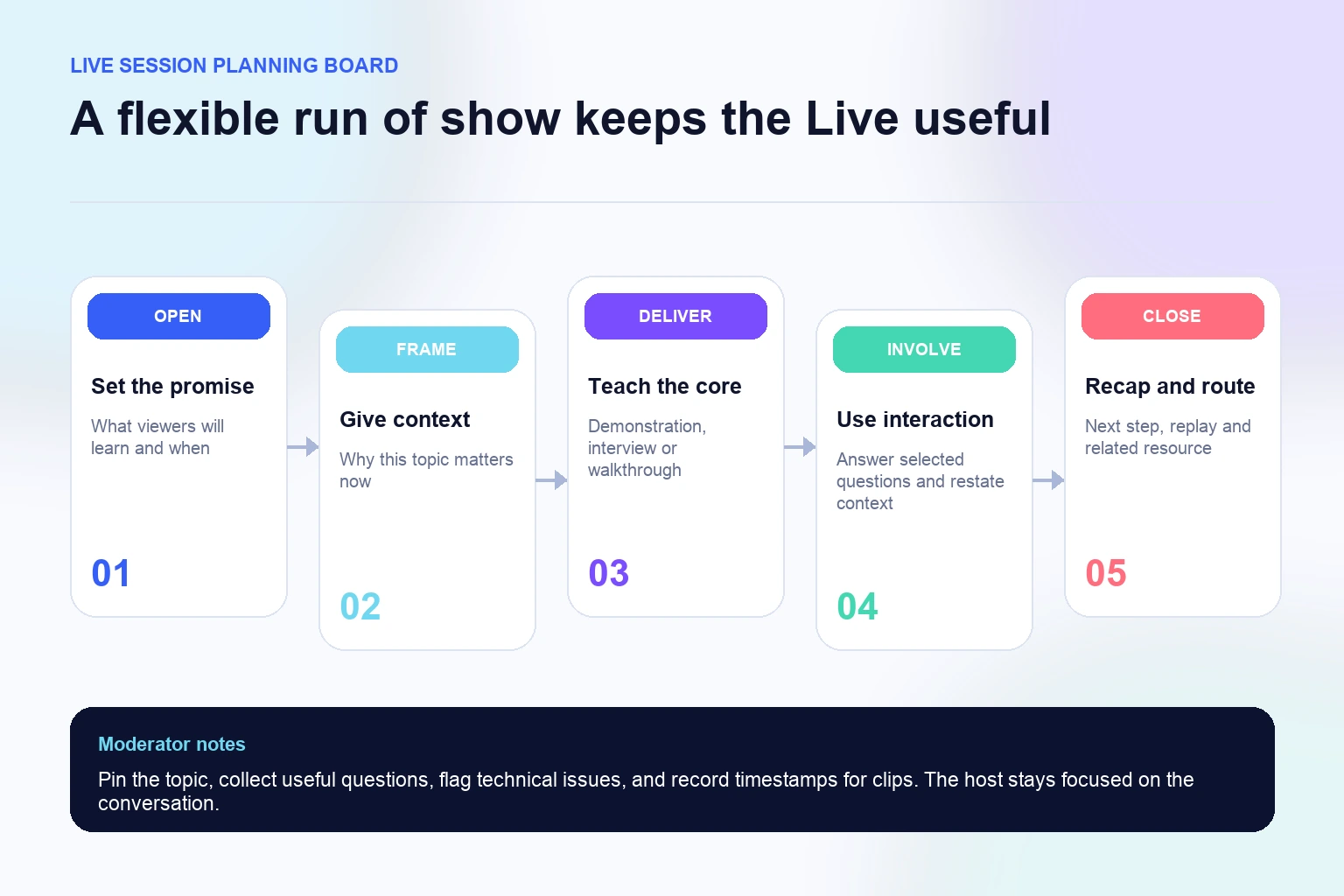
A run of show protects the promise while leaving room for a real conversation. Organize the broadcast into opening, orientation, core value, interaction, and close. Give each segment an objective rather than a rigid script. The host should know the essential example, proof, transition, and next step, while speaking naturally enough to respond to the audience.
Place the strongest value early and recap at meaningful breaks. A viewer who arrives midway needs a short bridge, not a complete restart. For a demonstration, show the result, explain the steps, then answer questions. For an interview, frame the question, let the guest answer, summarize the practical point, and connect it to the next question. Clear transitions help both live viewers and people watching later.
Use time as a planning tool rather than an automatic quality rule. Some subjects need a concise session; others support a deeper workshop. End when the promise is fulfilled and the useful questions are addressed. Extending a broadcast only to create a larger duration can lower clarity and make the replay harder to use.
Build interaction and moderation into the content
Plan interaction points around decisions the audience can genuinely influence. Ask which example needs a closer look, collect questions before a new segment, or invite viewers to identify a problem in a demonstration. The host should read enough context aloud for replay viewers to follow. Avoid turning the session into a roll call or treating every comment as equally relevant to the topic.
The moderator can group duplicate questions, flag the strongest ones, remove spam under the platform's controls, and protect people who accidentally post private details. Prepare a neutral phrase for questions outside the scope: acknowledge the subject, state that the Live cannot answer it responsibly, and point to an appropriate resource. This keeps the atmosphere welcoming without surrendering the event plan.
If a separate Instagram comments package is used on other content, do not combine those interactions with Live questions in the event report. For the Live, preserve the source and context of meaningful audience responses. Quality matters: one detailed question from the intended audience may be more useful than dozens of generic greetings.
Make the broadcast accessible and resilient
Speak clearly, name visual actions, and repeat audience questions before answering. Use accurate captions where the current product and workflow support them, and ensure key on-screen text has strong contrast and remains clear of interface controls. Describe a chart or physical demonstration for people who cannot see every detail. Accessibility improves comprehension for many viewers, including those watching without ideal sound or on a small screen.
Prepare for common failures: poor audio, guest disconnect, frozen video, low battery, lost notes, or an unavailable feature. The moderator should know the signal for pausing, switching devices, or ending. If the session stops, publish one verified update through the planned channel. Do not create multiple conflicting announcements while the team is troubleshooting.
Protect the audience and location. Avoid showing private screens, addresses, customer data, credentials, or people without consent. Delay a tour when the environment cannot be controlled. Never ask a viewer to post a password, authentication code, order number, or personal account evidence in public chat. A larger audience is not worth an avoidable privacy or security incident.
Turn the Live into useful follow-up content
After the broadcast, save or share the replay according to Instagram's current options and your permissions. Review it before promoting it. Add a clear title or context where the product allows, verify that promised resources work, and remove or avoid redistributing a segment that exposes private or incorrect information. The replay should stand on its own for someone who missed the live moment.
Use the moderator's timestamps to create a concise recap, short clips, an FAQ, a carousel, or a follow-up Story. Each derivative should add context rather than dropping a fragment that changes the meaning. Answer useful questions that the host could not reach, credit the guest, and connect viewers to the next relevant resource. A well-planned Live can supply a week of focused editorial material without repeating the same announcement.
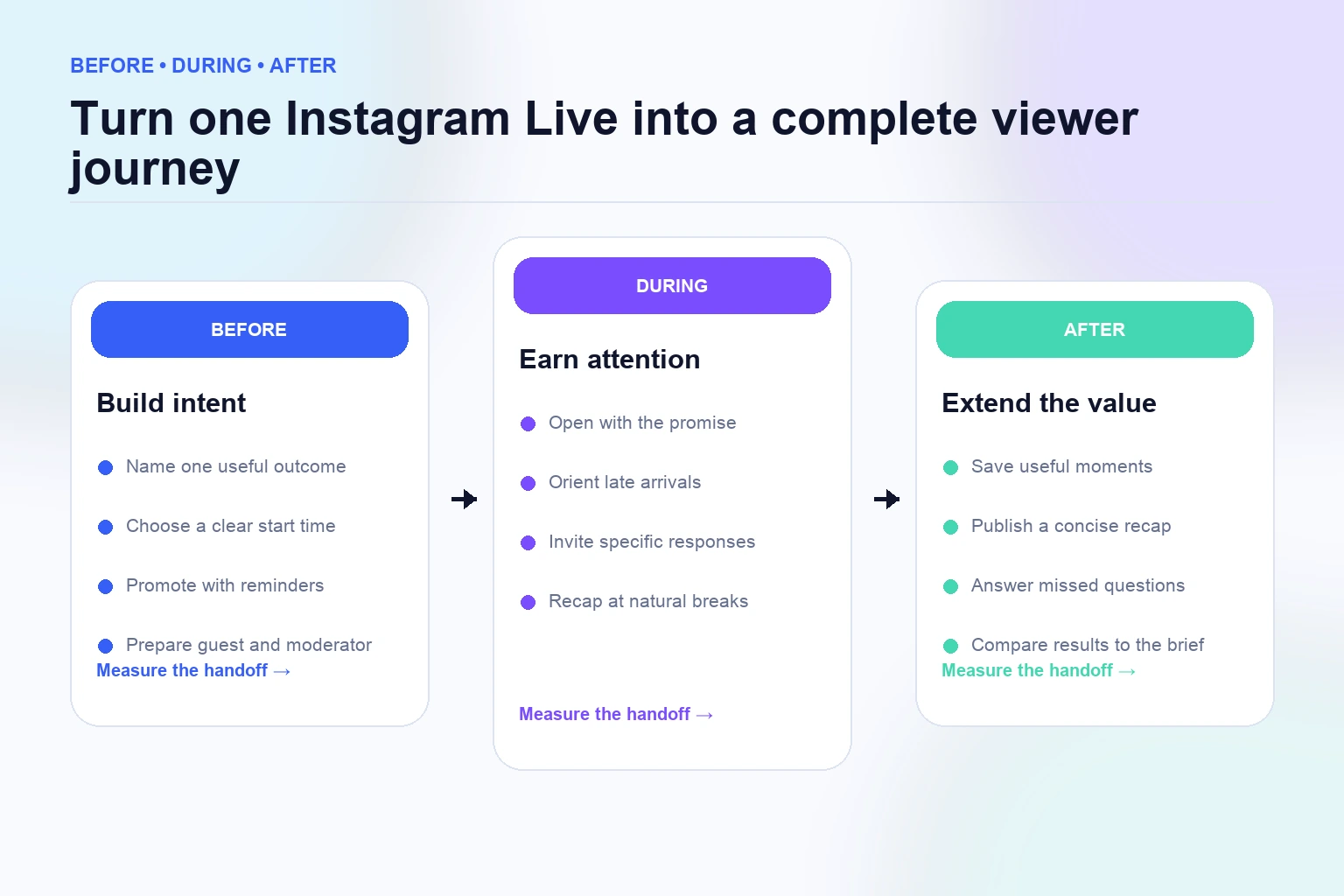
Review Story performance if Stories carried most reminders. A weak reminder sequence can reduce attendance even when the Live itself is strong. Diagnose its opening, frame sequence, time, and action separately. The funnel image in this guide is a useful model: promotion builds intent, the broadcast earns attention, and follow-up extends value. Improving one handoff at a time is more productive than blaming the entire event.
Measure the complete viewer journey and plan the next Live
Create four reporting sections: promotion, live session, replay, and follow-up. Under promotion, record placements, reminder timing, Story response, email or site activity, and partner distribution. Under live, use available viewer and interaction metrics plus notes about the opening, technical quality, questions, and segment transitions. Under replay, track the measures Instagram provides at comparable elapsed times. Under follow-up, record the primary action and qualified responses.
Compare sessions with similar topics, promotion, format, and length. A guest event with a partner share is not a fair baseline for a solo session promoted once. Use median or range across several broadcasts, and document major differences. The conclusion should state what happened, what else changed, what remains uncertain, and the one improvement selected for next time.
For an optional Live views order, save the eligible public broadcast, package, quantity, price, checkout and order references, start time, and written delivery terms. Keep login credentials private. Measure the order against those terms, and do not present packaged views as proof of organic recommendation, retention, or sales. A clear record lets the team use the service without corrupting the editorial learning system.
- Save the event brief, promotion record, and run of show.
- Report live, replay, and follow-up results separately.
- Record outside promotion and any packaged activity.
- Choose one improvement for the next broadcast.
Frequently asked questions
How do I get more viewers on Instagram Live?+
Build the full journey: choose a specific audience and outcome, promote a reliable time with useful reminders, open with value, use a clear run of show, involve viewers meaningfully, and publish a relevant follow-up. Measure each stage so you know where the audience path weakens.
How far in advance should I promote an Instagram Live?+
There is no universal interval. Give your audience enough time to plan, then test reminder timing against your own attendance. A simple campaign may use an early announcement, a value-adding reminder, and a final same-day notice without overwhelming followers.
What should I say at the start of an Instagram Live?+
Name the topic, intended audience, outcome, and format, then deliver one useful point. Explain how viewers can participate. Avoid waiting silently for the audience to grow because early viewers need a reason to stay.
How long should an Instagram Live be?+
Make it long enough to fulfill the promise and answer selected questions, then end clearly. Use your own retention, replay, and response patterns to refine duration. A rigid universal length ignores the difference between a short demonstration and a workshop.
Should I invite a guest to increase Live viewers?+
Invite a guest when their expertise, audience relationship, or perspective improves the topic. Confirm availability, product eligibility, promotion responsibilities, permissions, and the technical plan. A guest is not a substitute for a clear event promise.
What if nobody joins my Live immediately?+
Begin the useful opening as planned. The session may also serve replay viewers, and early arrivals should receive value. The moderator can confirm technical quality while the host states the topic and starts the first segment.
Can buying Instagram Live views make future Lives grow organically?+
A Live views package concerns the eligible active broadcast and terms shown by the provider. It does not guarantee future recommendations, retention, interactions, followers, or sales. Keep the order data separate from organic promotion and content results.
What should I measure after an Instagram Live?+
Report promotion activity, live audience and interaction metrics available to the account, segment notes, replay performance, profile activity, and the chosen follow-up action. Preserve exact labels and comparable time windows, and document partners or paid activity.
Compare Instagram Live Views packages.
Prepare the public destination, then review the quantity and terms that fit your goal.
View Instagram Live views packages