

Choose the Best Practices area that matches your immediate question
| Area Meta named | Useful question | Evidence to check outside the tip |
|---|---|---|
| Creation | Does the post explain its point early and clearly? | Open the actual post and review the first frame, caption and audience question. |
| Engagement | Can a viewer respond or ask something meaningful? | Read real comments and messages, with privacy and context in mind. |
| Reach | Is the content understandable to someone new? | Compare relevant content observations and check Account Status separately. |
| Monetization | Does an available program fit this account and content? | Read the program's current eligibility, terms and location limits. |
| Guidelines | Could the content or account need a policy review? | Read the applicable rule and any account-specific notice. |
Know what the Professional Dashboard can and cannot answer
Meta introduced Best Practices as an education hub within Instagram Professional Dashboard for creators in 2024. It described five areas: creation, engagement, reach, monetization and guidelines. Each area combines broad advice with personalized tips. That description explains the product's intended role: a place to learn and choose actions. It does not establish that every tip is a rule applied to every account, or that every dashboard card is present in your version of the app today.
Treat the dashboard as an audit prompt. It can point a bicycle shop toward making a repair demonstration clearer or remind a creator to read a guideline. It cannot tell the shop that a particular opening shot will produce a certain number of customers. It also cannot settle whether a dip in one post's views is a penalty. To investigate such claims, you need the actual post, a sensible comparison and sometimes another Instagram tool.
Three tools often get blurred together. Best Practices suggests things to consider. Insights reports measurements and has its own definitions and limitations. Account Status is where you check account-specific standing or recommendation eligibility when that question arises. Switching among personal, creator and business account types is another decision entirely. Start by naming which question you have; this avoids treating every colorful card as a diagnosis.
Find the relevant area without assuming every account has it
Open the Instagram account that publishes the work and inspect the profile for Professional Dashboard or its current equivalent. Meta's 2024 announcement described a rollout to creators. Account type, location, eligibility, rollout and later interface changes can affect what you see. A business owner should not assume that an announcement addressed to creators guarantees identical access or a fixed menu location for every business account. Follow the labels in your own app and read any eligibility note shown there.
If Best Practices appears, select the area matching your decision. Avoid treating every suggestion as a task for today. If it does not appear, check the intended profile, the current official app, account type and any explanation Instagram supplies. Do not switch account type solely to chase an old screenshot.
Missing access does not itself mean the account is restricted. Check Account Status separately for recommendation eligibility. To understand a specific post, inspect its content and available data. A paper audit can still use the method below; the dashboard is no prerequisite for posting.
- Open the Instagram account whose content you intend to review, then look on its profile for Professional Dashboard or the current equivalent.
- If Best Practices is available, read the area that matches your question before opening unrelated tools.
- If the area is absent, verify the account type and current app without assuming that a missing card means a penalty.
Bring one decision and one observation to the dashboard
The highest-value visit begins before you tap the dashboard. Write one sentence such as, 'Do people understand what our bike tune-up includes from the first seconds of the Reel?' That sentence is more useful than 'How do we grow?' because it identifies content you can inspect and change. A creator may ask whether a tutorial invites useful questions. A local service business may ask whether its post tells viewers how to book. Neither needs a claim that Instagram rewards a particular trick.
Choose a recent post related to that question and identify one observed response. For example, perhaps viewers repeatedly ask where the repair happens even though the caption contains the address. That is evidence of a communication problem, though it does not prove why the post was distributed as it was. Note whether the question came from actual comments, messages or a teammate's review. Keep private messages private; summarize themes instead of copying customer details into a shared worksheet.
Now look for relevant Best Practices guidance. Write the tip in your own words and ask whether it helps answer your particular question. If a tip suggests explaining the topic sooner, check the opening frame. If it suggests responding to your community, read the unanswered comments first. If it concerns an eligibility program you do not use, set it aside. The goal is one defensible action, not a long list of generic improvements.
- Write one decision in plain language: what should we make, explain, change or verify next?
- Choose one recent piece of content and one audience response that relate to that decision.
- Record the advice you saw in your own words, then decide what observation could support or challenge it.
Use the five areas as a decision map
Meta's five headings are a map, not five interchangeable growth levers. Creation concerns what you make and how it is presented. Engagement concerns conversation and interaction around it. Reach guidance can help you think about discovery, but it is not a private explanation of Instagram's ranking system. Monetization describes possible earning paths and requirements where relevant. Guidelines point you toward rules and account conduct. Their usefulness depends on the decision in front of you.
The table above pairs each area with a reader question and independent evidence to check. A shop whose customers ask for the repair price should begin with creation and perhaps engagement, because the post and replies can reveal whether the offer is clear. A creator whose concern is eligibility for a specific earning feature should read that feature's current requirements, not infer an answer from content advice. Someone worried about an account-level restriction should look at Account Status rather than treating a reach tip as a verdict.
Read the actual card's wording carefully. Some advice may be broadly applicable; other advice may be personalized or conditional. If you cannot state what the suggestion would change in your next post, there is no need to act on it yet. Save the idea and return when it matches a concrete question. This also keeps a team from changing its captions, visual style, posting time and format at once, then claiming the dashboard caused whatever happened next.

Audit creation with the viewer's first question
For the creation area, put a real post beside the advice. Can a new viewer tell what the post is about before an unfamiliar product name or long introduction appears? Is the first visual showing the task or merely a decorative scene? Is the caption accurate and easy to scan? These are editorial checks your team can perform even if the particular tip on your screen differs. They do not require pretending that Instagram has published a universal ideal length or posting frequency.
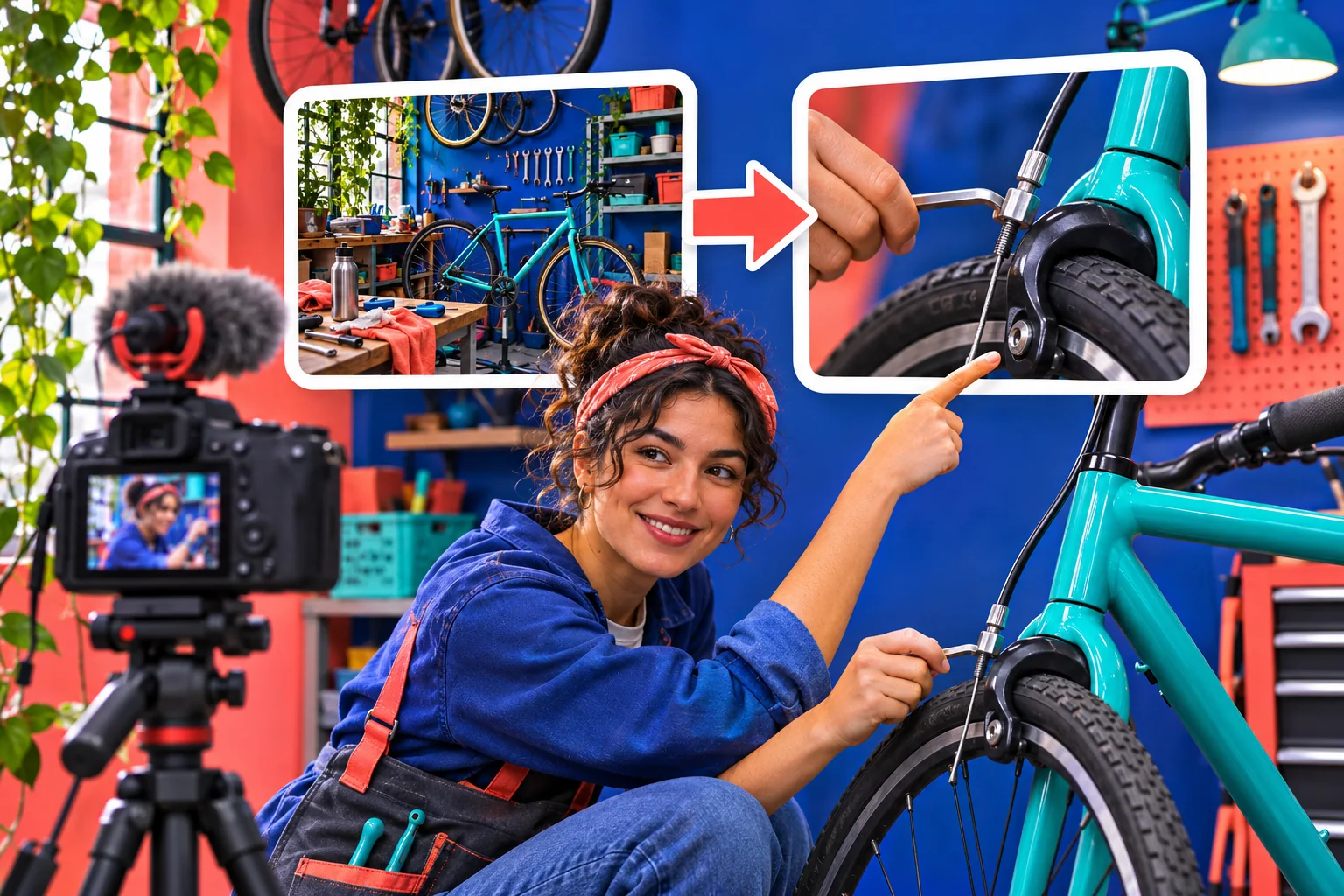
Imagine a bike shop Reel that opens with the owner's face for several seconds, then reveals a brake adjustment. Customers keep asking what service was performed. A better next version could begin with a close shot of the brake and one spoken sentence explaining the problem. Keep the topic and intended audience similar. The change aims to make the explanation clearer; it is not a promise to increase views. The visual next to this section later in the guide illustrates that single-change idea.
Check the rest of the piece too. A cover should still make sense at thumbnail size, captions should match spoken instructions, and a business call to action should describe the real next step. If the post needs a location, booking route or eligibility condition, include it accurately. Create a short review checklist for the next two posts, then compare whether people ask fewer clarification questions. More polished editing is not automatically more useful than a plain demonstration that answers a real need.
Use engagement guidance to improve the conversation
Engagement is easiest to misread when a team treats every interaction as interchangeable. A like can mean brief approval. A comment may contain a question, objection or practical detail. A saved tutorial may be useful in a different way from a joke that attracts quick replies. Read the actual conversation before turning a Best Practices suggestion into a target. Your task may be to answer an existing question, clarify a caption or make the next post more open to a relevant response.
For example, a repair shop posts a tire-pressure demonstration. Several viewers ask whether the instruction applies to commuter or mountain tires. A useful follow-up could state the scope early and invite people to check the marking on their own tire. That response serves customers even if the next post gets fewer likes. Avoid invented 'comment bait' and promises that replying at a certain speed will force distribution. A sincere answer can improve the experience without being a ranking tactic.
If you manage a large inbox, group repeated questions by topic and protect personal information. Record 'five people asked whether booking is required' only if you truly counted five; otherwise write 'several people asked.' Use the engagement area to choose a conversation to improve, then evaluate the response in context. Compare followers, comments, saves and messages only with their definitions and limitations in mind. A follower purchase, if considered separately, does not manufacture this kind of meaningful dialogue.
Read reach advice without turning it into an algorithm claim
A reach suggestion is a prompt to inspect how understandable and discoverable the work is to a relevant stranger. It is not a secret guarantee about recommendations. A post can have a good first frame and still reach few people for reasons that are hard to isolate. Topic fit, account history, audience behavior and platform changes can all complicate comparisons. Do not claim that a single dashboard tip explains a sudden fall in views or that following it will restore an old number.
If people cannot tell what the post covers, fix that communication problem first. Use a clear description, accurate topic language and a visual showing the central action. Our Instagram Search guide covers how people may find content through search; it should not be collapsed into Best Practices. If your question is whether the account is eligible for certain recommendations, use Account Status. Eligibility and actual distribution are separate ideas; a green status does not promise that a post will be recommended widely.
Compare content sensibly. Look at several posts serving similar audiences and note format, topic and presentation differences before forming a hypothesis. A holiday post, a technical tutorial and a customer story are not controlled copies of one another. Keep a dated record of what you changed and why. When a result differs, describe it as an observation, not proof that you discovered Instagram's ranking formula. That distinction protects your next decision from overreacting to normal variation.
Separate monetization, program access and guidelines
Meta includes monetization among its Best Practices areas, but a dashboard suggestion does not enroll an account in an earning program. Read the current rules for the specific feature, including eligibility, region, account conduct and content requirements. Meta's 2024 Instagram Creator Marketplace announcement gives a narrow example of another professional-dashboard route: creators could join that marketplace from the dashboard in supported markets. That is a separate product with its own availability, not evidence that every account can use every monetization tool.
A business selling its own service has a different question from a creator seeking a platform payout or brand partnership. The bike shop may need an accurate service description and booking route; it does not need to apply for a creator program to make its Instagram useful. If you see a monetization card, ask which program it refers to, whether it is available to your account now, and what obligations follow. Avoid announcing eligibility or potential income before the feature itself confirms it.
Guidelines deserve a similarly careful reading. If a card reminds you about a rule, open the applicable official policy and compare it with the actual content. A generalized reminder is not proof of a violation. For a specific account warning or recommendation issue, check the notice and Account Status rather than guessing. If a post contains a customer testimonial, music, product claim or borrowed footage, the practical task may be to verify permission and accuracy before publishing. Keep records of corrections and approvals that matter.
Run one small, observable content test
Turn one relevant tip into a change you can actually describe. Suppose the bike shop's old Reel opens with a room-wide shot and the brake adjustment appears late. The next comparable Reel could start with the mechanic showing the brake, then explain the service. That is the one planned change. Do not simultaneously move to a different audience, introduce a discount, double the length and rewrite the entire offer. If other things do change, note them rather than pretending the test was controlled.
Write a four-line test note: the audience question, old post observation, planned change and review window. For example, 'New viewers ask what the tune-up includes; the repair is not visible early; show the brake adjustment first; review comments and in-app post data after the same number of days used for the earlier comparison.' No invented baseline or target figure is needed. If you have enough relevant past posts, compare several rather than choosing only the one that flatters the new idea.
The illustration beside this section shows a close-up replacing a cluttered introduction. It is a creative example, not a depiction of Instagram's editor or an outcome graph. When the new post goes live, keep the record of its actual first frame and caption. If clearer footage reduces repeated basic questions, that is useful evidence for the business. If views change, you can report the change without claiming that the opening shot alone caused it.
- Name the audience question and the part of the old post that failed to answer it promptly.
- Plan one change in the next comparable piece, such as a closer first shot or clearer opening sentence.
- Keep topic, audience and format reasonably comparable; note other differences rather than hiding them.
- Review the result after a consistent window, alongside comments or messages and the relevant in-app measures.
Review the result with a balanced weekly note
A weekly review is enough for many small teams. Revisit the question, chosen suggestion and published post. Record what changed and what remains uncertain. Read comments or messages for evidence of understanding. Use available Insights measures with their definitions. A single post is noisy; avoid treating one day as a platform law.
Use three headings in a shared note: 'We changed,' 'We observed,' and 'Next question.' A shop might write, 'We showed the brake repair in the first shot. Fewer viewers asked what the clip demonstrated, while several asked about booking. Next, we will make the booking route clearer.' This is more actionable than 'The algorithm liked us.' If the observation is ambiguous, say so. A team can still keep a useful format while waiting for more comparable examples.
Return to Best Practices when a decision needs guidance. A calendar can hold experiments without making every suggestion an obligation. Review policy and program requirements when your offer or eligibility changes. Share the conclusion with whoever writes, films or answers customers, so the next change is intentional.
Troubleshoot missing guidance and keep commercial choices separate
If Professional Dashboard or Best Practices is absent, confirm the logged-in account, its type, the current official app and any eligibility explanation Instagram displays. Features can roll out or change. If only one card is missing, avoid concluding that the whole account is impaired. For a suspected account-specific restriction, inspect Account Status and any formal notice. For an app fault, use Instagram's in-app help and describe the device, app version and exact control missing. Never give your password to a tool promising to unlock a dashboard.
If the advice seems stale or unrelated, ask what decision it would actually improve. Personalized guidance can be imperfect. You can ignore a suggestion that does not fit your audience or current work, then use the five-area framework to review the post yourself. Keep a screenshot or short note of the wording if a teammate must interpret it later, but avoid publishing private account details. An editorial decision should be traceable to a real audience need and your own evidence.
HitsBoost follower packages are a separate optional purchase for a different count goal. They do not provide Professional Dashboard access or make its advice more effective, and a purchased count cannot guarantee reach, engagement, recommendations, leads or sales. If comparing that service, read the current product terms and decide independently whether it fits your goal. Your content audit should stand on its own: choose a question, check the relevant guidance, make one useful change and review what your audience actually did.
- Confirm you are in the intended account and current Instagram app.
- Read any eligibility or policy notice that Instagram actually shows.
- Check Account Status for account-specific recommendation issues; do not infer a restriction from missing Best Practices alone.
- Use official in-app help for an account-specific problem; avoid tools that request your password to unlock features.
Frequently asked questions
What is Instagram Professional Dashboard for?+
It is a professional-account area for tools and guidance. Meta introduced Best Practices there for creators, organized around creation, engagement, reach, monetization and guidelines. The exact controls available to your account can change.
Where can I find Instagram Best Practices?+
Open the intended Instagram account and look on its profile for Professional Dashboard or the current equivalent. If Best Practices appears, choose the area that matches your question. Meta's 2024 announcement described a creator rollout, so do not assume every account sees the same menu.
Can a business account use every Professional Dashboard feature?+
Do not assume so. Account type, location, eligibility and rollout can affect individual tools. Check the current app and the feature's own eligibility message. A missing card alone does not prove an account penalty.
Is Best Practices the same as Instagram Insights?+
No. Best Practices offers guidance or suggestions; Insights shows measurements available to the account. Use the former to form a question and the latter, with its definitions and limits, to examine relevant observations.
Does a reach tip explain why my Reel views dropped?+
Not by itself. A tip is not an account-specific diagnosis or a ranking guarantee. Compare several relevant posts, inspect the actual content, and check Account Status separately if you suspect a formal eligibility issue.
Does a green Account Status guarantee reach?+
No. Account Status can help identify account-specific eligibility issues, but eligibility and actual distribution are different. A post may be eligible yet reach a limited audience.
Will following Best Practices make me eligible for monetization?+
No guarantee follows from reading or acting on a card. Each earning feature or marketplace has its own current availability and requirements. Open the specific program's terms before planning around it.
How often should I check the dashboard?+
Check it when you have a concrete publishing, conversation, eligibility or policy question. For many small teams, a weekly review of one useful change is more manageable than acting on every suggestion.
Should I buy followers to improve dashboard recommendations?+
No. A follower package is a separate commercial choice and cannot guarantee better guidance, reach, engagement, recommendations, customers or sales. Make the content and account audit independently.
Compare Instagram Followers packages.
Prepare the public destination, then review the quantity and terms that fit your goal.
Compare Instagram follower packages as a separate option