
Instagram comment quality review
| Dimension | What to look for | Next action |
|---|---|---|
| Relevance | Comments respond to the post's actual subject | Clarify the prompt if replies drift or stay generic |
| Specificity | People provide examples, choices, reasons, or questions | Ask for one detail instead of a broad opinion |
| Depth | Threads move beyond one-word reactions | Use a selective follow-up that advances the topic |
| Reciprocity | The creator replies and participants respond to one another | Reserve time for hosting after publication |
| Sentiment | Positive, neutral, critical, and confused responses are distinguished | Answer useful criticism and correct misunderstandings |
| Safety | Spam, harassment, private data, and harmful replies are handled consistently | Apply filters, remove or report content, and document escalation |
| Learning | Questions and themes suggest the next content decision | Add the strongest unanswered question to the editorial plan |
Build a conversation, not a comment counter
A useful Instagram comment shows that someone understood, questioned, extended, or reacted to the content in a meaningful way. Ten relevant comments can reveal more than a hundred copied reactions because they contain language, objections, examples, and requests the creator can use. Set the goal accordingly: learn what the audience needs, help people compare options, collect experiences, answer uncertainty, or create a welcoming discussion around the post.
Comment count is still a valid metric, but it should not stand alone. A large thread can contain spam, repeated emojis, unrelated promotion, or conflict that creates work without value. Review relevance, specificity, depth, reciprocity, and safety. Those dimensions help a team distinguish healthy participation from noise and prevent a report from calling every visible response successful engagement.
If you compare an Instagram comments package, be precise about its scope. A package concerns the eligible comments described in the live offer; it does not guarantee organic conversation, recommendations, reach, followers, sales, or approval under Instagram's rules. The strongest long-term comment strategy still comes from content that gives real people a clear and worthwhile reason to respond.
Choose the conversation goal before the prompt
Decide what kind of answer would help. A product team might ask which feature creates the most friction. A coach might ask where people stop in a process. A food creator could ask which substitution worked. A travel account could invite one practical local tip. The question becomes easier to write when the desired response is defined as information rather than simply 'more engagement.'
Match the goal to the content. A demonstration can invite a result or technique, a comparison can ask for a reasoned choice, a story can invite a related experience, and a myth-correction Reel can ask what misconception the audience hears most. Do not attach an unrelated question to a post just because it is easy to answer. The comment should feel like the next part of the content.
Set a boundary. Avoid prompts that request medical, financial, location, login, or other sensitive information in public. Do not invite people to name and shame others, expose a private dispute, or disclose a child's personal details. A conversation goal includes knowing what should stay out of the thread and where a customer-specific question should be handled instead.
Write prompts people can answer with substance
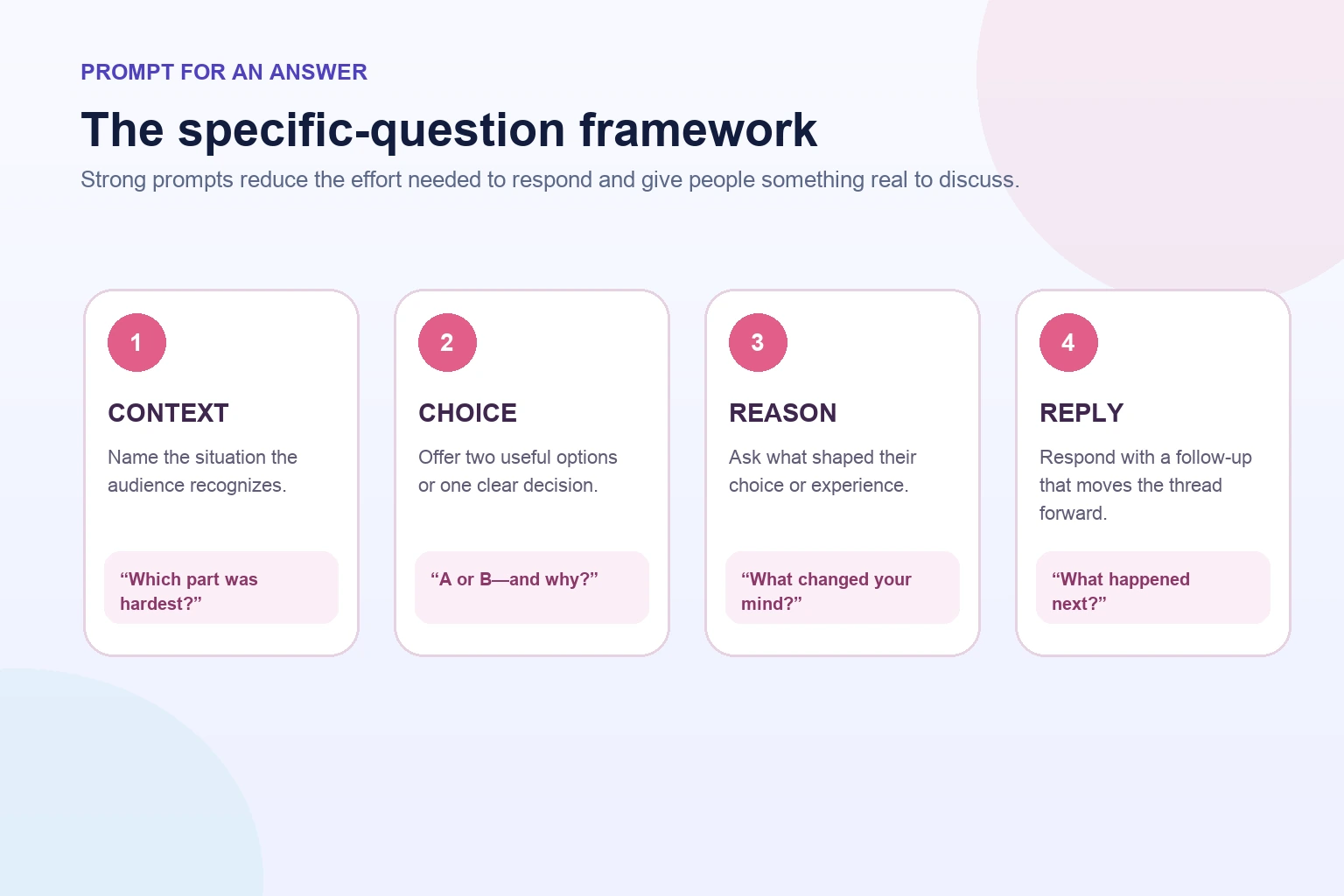
The most useful prompt has four parts: context, one specific question, a low-friction way to answer, and a reason the answer matters. For example: 'If you have tested both openings, which held attention longer and what changed?' The viewer can respond briefly, but the question invites evidence. Compare that with 'Thoughts?' which leaves the subject, depth, and purpose undefined.
Use constrained choice when the audience needs help starting. Ask which of two covers is clearer, which step is hardest, or which example should become a full tutorial. Then invite a reason. The choice lowers effort and the reason creates substance. Avoid false binaries when both options can be valid, and include 'another approach' when the audience may have experience outside the examples.
Use experience prompts carefully: 'What did you try?' is stronger after you have shared your own method and limits. Use prediction prompts before a reveal, diagnostic prompts after a tutorial, and reflection prompts after a story. Rotate formats so the audience is not trained to expect the same final sentence on every post. A repeated 'comment YES' formula may inflate short replies while teaching very little.
- Context: connect the question to the lesson, example, or decision in the content.
- Specificity: ask for one experience, choice, reason, or next step.
- Ease: make a useful short answer possible without forcing a one-word response.
- Purpose: explain how the answer helps the creator or the community.
- Boundary: avoid requesting private, sensitive, or unsafe information.
Match the prompt to the post or Reel format
For a carousel, let each card build toward a decision and use the caption prompt to compare steps. Ask which slide needs an example or which mistake is most familiar. For a before-and-after post, ask what constraint mattered most rather than inviting praise alone. For a list, ask the audience to add one missing item and explain when it applies.
For a Reel, place the spoken or on-screen question after the viewer receives enough value to answer. A tutorial can ask where people get stuck; a reaction Reel can ask for a respectful counterexample; an experiment can ask what variable to test next. Put a concise version in the caption and, when appropriate, a pinned creator comment so the question remains visible as the thread grows.
For a launch post, answer the essential product question in the content before inviting discussion. Ask about use case, obstacle, or priority rather than requesting generic excitement. If the Reel is being reviewed at its first 1,000 views, compare comment quality with watch time and shares. A strong conversation around a misunderstood clip may still signal that the explanation needs work.
Place the call to comment after delivering value
A comment request works best as the next step in a complete piece of content. Teach the method, show the result, make the argument, or tell the story first. Then ask the audience to contribute one relevant piece. Leading with a demand for comments before earning attention can feel transactional and may produce lower-quality responses from people who have not understood the post.
Keep the wording natural. 'Which step would you test first, and why?' is direct. 'Tell me the city and I will suggest one filming angle' gives a clear exchange when the creator can actually follow through. Avoid manufactured urgency, guilt, or claims that people must comment to receive basic information already promised in the post. If a resource requires a separate signup, disclose that path clearly.
Use one primary prompt. Asking people to like, follow, share, save, tag three friends, comment a keyword, visit the bio, and send a message in the same caption divides attention. Select the action that best fits the content. Other actions may happen because the post is useful; they do not all need to appear as instructions.
Host the thread with useful replies
Reply while the topic is current, but prioritize substance over speed. Acknowledge the person's point, answer what you can, and ask a follow-up only when it advances the conversation. 'Thanks!' can be polite; 'That timing problem is common—does it happen during filming or editing?' creates a more useful branch. Do not turn every comment into an interrogation.
Use replies to organize knowledge. Correct an error respectfully, link to an existing resource when relevant, and pin a comment that adds context or answers a repeated question. If several people ask the same thing, publish a follow-up post or Reel and return to the thread with the answer. This shows that comments influence the editorial plan and gives the audience a reason to participate again.
Create a response guide for a team account. Define voice, response time, topics that require a subject-matter owner, and issues that move to support or legal review. Give community managers room to sound human rather than copying one sentence across every thread. Repetition can look automated and may frustrate people who asked different questions.
Moderate for safety, relevance, and trust
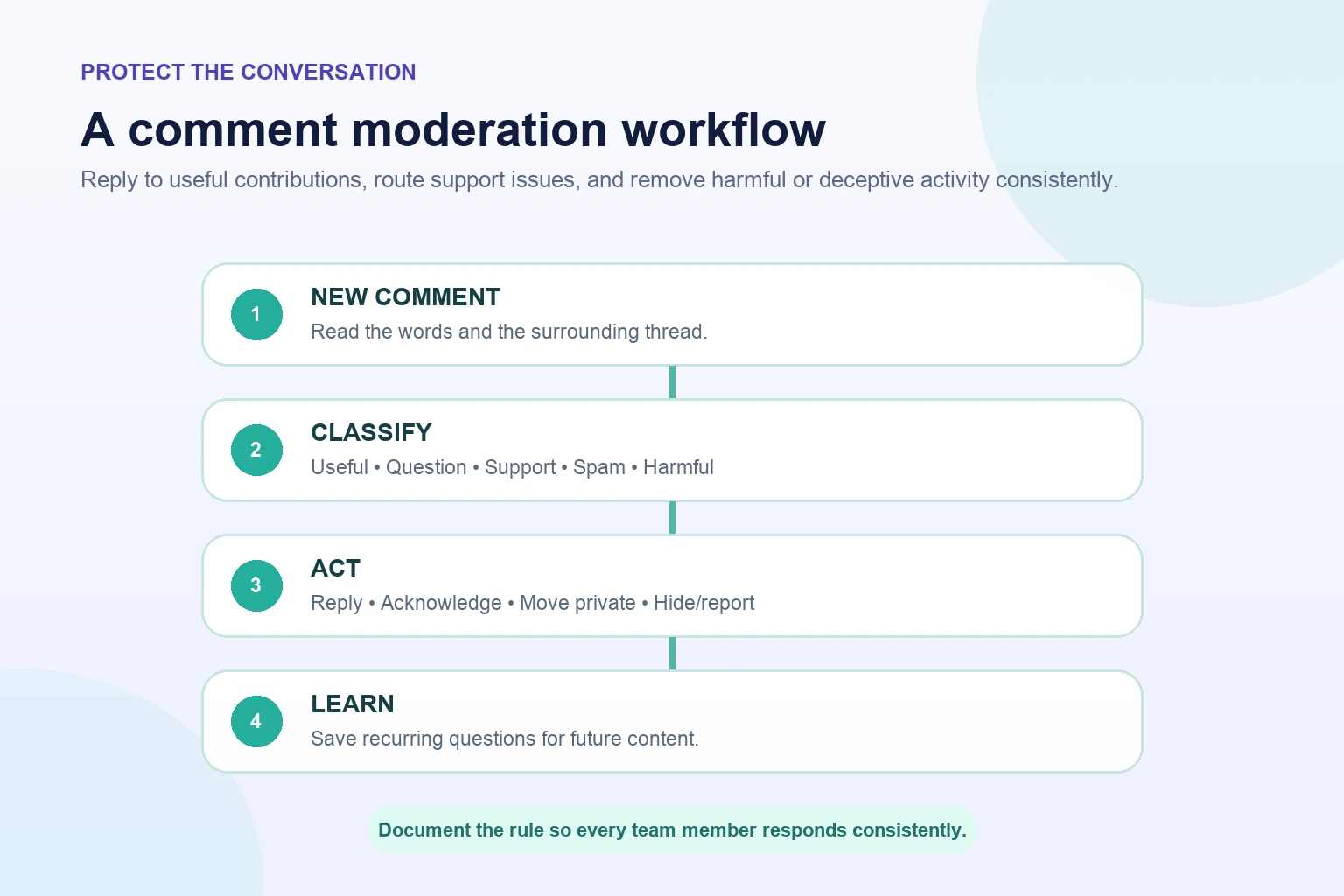
A welcoming thread needs visible boundaries. Use Instagram's current comment controls, filters, limits, hiding, deletion, restriction, and reporting options as appropriate for the account. The exact controls can change, so review them in the app and Help Center. Tell the team which behavior is removed, which receives a reply, and which is documented and escalated.
Distinguish criticism from abuse. A customer describing a real problem can provide valuable feedback even when the comment is negative. Respond with what is known, correct misinformation with evidence, and move account-specific details to an appropriate private support channel. Remove or restrict content when it is spam, impersonation, targeted harassment, a scam, or a risk to another person's privacy or safety.
Protect the moderator too. Do not require one person to absorb threats or repeated abuse without support. Establish an escalation contact, keep records where necessary, and step away from bad-faith arguments. A brand does not have to win every public exchange. Consistent, calm moderation protects the useful participants and the credibility of the thread.
- Reply when the comment adds a relevant question, experience, correction, or useful disagreement.
- Filter or hide repetitive promotion, scams, impersonation, and disruptive spam according to account policy.
- Report threats, targeted harassment, or other content that may violate platform rules.
- Move customer-specific or private details to an appropriate support channel without asking for sensitive data publicly.
- Record recurring risks and update the team's response guide after the campaign.
Avoid spam, engagement bait, and artificial conversation
Instagram's Community Guidelines caution against artificially collecting likes, followers, or shares and posting repetitive comments or content. Do not build a comment plan around copy-paste replies, coordinated comment pods, misleading giveaways, or repeated keywords with no relationship to the post. Those tactics can create a larger number while making the conversation less credible and potentially increasing policy risk.
If a comments package is considered, review the live terms, supported public destination, comment option, language availability, moderation risk, and platform rules before purchase. Keep the post public and comments enabled only as required by the offer and campaign. Do not share an Instagram password or authentication code. Do not claim that ordered comments are organic customer endorsements or proof of product experience.
Avoid testimonial confusion. A comment that appears to describe a purchase, result, or personal experience can mislead viewers if that experience did not occur. Keep marketing claims truthful and review disclosure obligations that apply to the business and region. When the goal is real customer feedback, ask verified customers through an appropriate channel and preserve their words accurately with permission.
Measure comment quality as well as volume
Start with the count, then classify the thread. How many comments address the subject? How many contain a question, example, reason, objection, correction, or request? How many are creator replies, repeated messages, spam, or unrelated promotion? A simple manual sample can reveal more than an engagement total because it shows what kind of participation the post created.
Measure reciprocity carefully. Creator replies increase the total comment count, so separate audience comments, creator replies, and threaded follow-ups. Track unique participants when the available data allows it. A thread with five people having useful exchanges is different from fifty disconnected one-word responses, and both are different from one account posting repeatedly.
Connect comments to learning. Record the top three questions, the most useful objection, the most common misunderstanding, and the idea that deserves a follow-up post. Add profile actions, link activity, enquiries, or customer-support outcomes when they match the campaign goal. Do not claim that comments caused later sales unless the attribution method can support that conclusion.
Coordinate comments with views and likes without blending the claims
Views, likes, comments, shares, saves, and follows are separate actions. A Reel can be widely viewed and lightly discussed, or receive a small but detailed conversation from a focused audience. Read them together to understand the content, but keep each count and service scope separate. Buying views does not include comments, and a comment package does not guarantee likes or reach.
Use the sequence of behavior to improve content. If views are strong and comments are weak, the prompt may be vague or the Reel may close before the audience knows what to discuss. If likes are strong and comments contain repeated questions, the post may be appealing but incomplete. If comments are rich and views modest, the topic may be valuable to a smaller audience and worth distributing more deliberately.
Keep all added promotion in the campaign timeline. Note paid ads, creator collaborations, newsletter traffic, Story shares, likes packages, views packages, and comments packages. This does not perfectly identify the source of every interaction, but it prevents the report from presenting a mixed campaign as spontaneous organic response. Use natural community work—replies, follow-up content, and profile clarity—to make the attention useful.
Run a 14-day Instagram comment improvement plan
On days one and two, choose one conversation goal and collect ten real questions from messages, sales calls, support tickets, search queries, or previous comments. Turn three into prompts using context, one specific question, and a reason to answer. Prepare the moderation rules and assign time for replies before scheduling the posts.
On days three through eight, publish two pieces in comparable formats with different prompt styles. Host each thread, classify the responses, and create one follow-up post from the strongest question. Note content distribution, likes, views, saves, shares, and profile actions, but do not blend them into the comment count. Resolve spam and safety issues using the same moderation path.
On days nine through fourteen, test a refined prompt, review the three threads, and document which wording produced relevant, specific, and reciprocal conversation. Choose one repeatable format for the next month. The final output should be an editorial decision—what to explain, demonstrate, or ask next—not simply a total number of comments collected during the test.
- Days 1–2: choose the conversation goal and collect ten real audience questions.
- Days 3–5: publish two prompt styles and reserve time for thoughtful replies.
- Days 6–8: review quality, moderate consistently, and create one answer post from the comments.
- Days 9–11: test a contrasting prompt on a similar format.
- Days 12–14: compare the threads, document lessons, and choose the next repeatable format.
Frequently asked questions
What kind of question gets more Instagram comments?+
Ask one specific question connected to the content. Invite an experience, choice with a reason, useful example, obstacle, or next step. Make a short answer possible while leaving room for detail, and avoid requesting sensitive information.
Should I put the comment prompt in the Reel or caption?+
Use the format that makes the question clear after the content delivers value. A concise spoken or on-screen prompt can work in a Reel, with a fuller version in the caption or a pinned creator comment. Keep one primary request.
Does replying to comments help?+
Replies make the creator present and can develop a useful thread. Answer genuine questions, add context, and ask selective follow-ups. Avoid copying the same reply everywhere or turning every comment into an interrogation.
How quickly should a creator reply to Instagram comments?+
Reply while the topic and campaign are current, using a schedule the team can sustain. Substance and consistency matter more than racing to answer every message. Escalate support, legal, privacy, or safety issues through the appropriate route.
Should negative Instagram comments be deleted?+
Not automatically. Relevant criticism can provide useful feedback. Reply calmly when a correction or solution helps. Filter, hide, restrict, delete, report, or escalate spam, scams, impersonation, harassment, threats, and privacy risks according to the account's moderation policy.
Can I buy Instagram comments for a post or Reel?+
Review the current comments service for eligible public content, supported options, destination requirements, and terms. Protect account credentials and understand that a package does not guarantee organic reach, recommendations, followers, sales, or policy approval.
How do I measure whether an Instagram comment section is good?+
Track relevance, specificity, depth, unique participation, creator replies, follow-up threads, sentiment, moderation load, and the questions or ideas the audience contributes. Keep raw comment volume, added promotion, and business outcomes in separate fields.
Compare Instagram Comments packages.
Prepare the public destination, then review the quantity and terms that fit your goal.
Review Instagram comments packages